Public Changelog

A Public Changelog That Updates Itself

FlagUp publishes a changelog entry the moment you ship a feature, notifies every follower automatically, and runs under your own brand. No copy-paste, no extra tools.

Built for modern product teams, agencies, and startups.
Why It Matters

Why Every Product Needs a Public Changelog

Users who do not know what you have shipped assume you have shipped nothing. That silence creates churn.

Fewer support tickets

Users who can read what changed stop emailing to ask. A well-maintained changelog cuts the most common support question: "When is X coming?"

Stronger user trust

A live public changelog proves your product is moving. Users who can see momentum are more likely to renew and recommend your product to others.

Retention signal

Changelog updates give users a reason to check in, log back in, and re-engage. Each entry is a small retention nudge delivered for free.

How It Works

How FlagUp Publishes Your Changelog Automatically

No copy-paste, no manual formatting. Shipping a feature creates the changelog entry.

Users submit ideas

Feature requests land in your FlagUp inbox from your voting board, embedded widget, or suggestion box.

You ship the feature

Move the item to "Shipped" status in your dashboard. FlagUp creates the changelog entry automatically, with your release notes and screenshot.

Followers get notified

Every user who voted on or followed the feature request gets an automatic email notification that the feature is now live.

Changelog stays current

Your public changelog page updates in real time. No manual publishing, no copy-paste into a separate tool, no outdated release notes.

What You Get

What a Great Product Changelog Looks Like

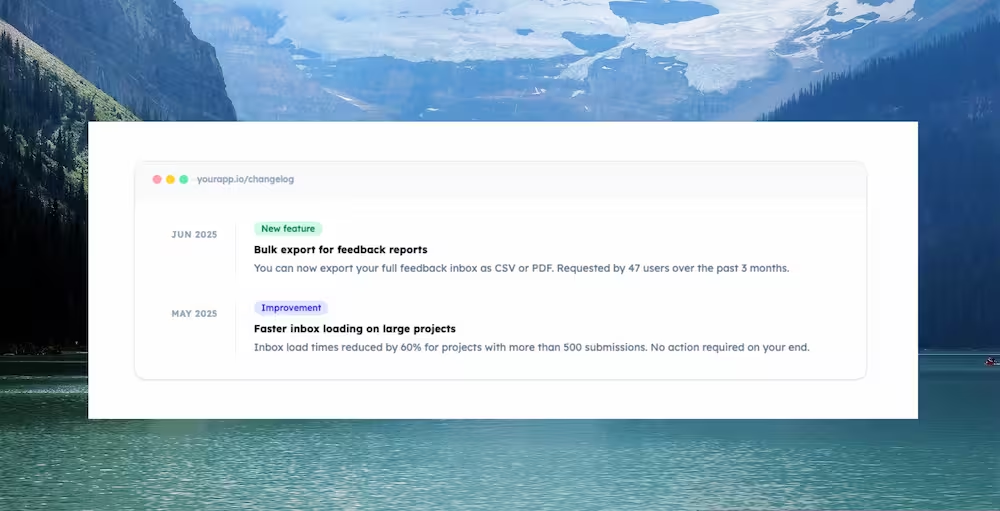
A FlagUp changelog is clean, browsable, and always up to date. Here is what each entry includes.

What a Great Product Changelog Looks Like
Features

Everything You Need to Run a Great Changelog

The tools your team needs to publish, notify, and build trust with every release.

Manual release entries

Create a changelog entry from your dashboard with a title, description, category, and up to two screenshots.

Release categories

Tag each entry as a new feature, improvement, or bug fix so users can scan what changed at a glance.

Screenshot uploads

Attach up to two images per entry. Supports jpg, png, and webp up to 2 MB each.

Custom domain

Host your changelog at your own subdomain. Set your project domain once and it applies to your changelog URL.

FAQ

Frequently Asked Questions

Common questions about running a public changelog with FlagUp.

What is a public changelog?

A public changelog is a page where your product team publishes a running list of new features, improvements, and bug fixes. It keeps users informed, reduces inbound support questions, and signals that your product is actively improving.

How does FlagUp auto-update the changelog?

When you move a feature request or roadmap item to shipped status in FlagUp, the changelog entry is created automatically. You can add release notes, screenshots, and notify all followers in one click.

Can I white-label my changelog?

Yes. Every paid FlagUp plan includes white-label branding. Your changelog runs on your own subdomain or custom domain with your logo and colors, no FlagUp watermark.

Is the changelog tool free?

Yes. FlagUp includes a read-only public changelog on the free plan. Full publishing and white-label branding are available from $19 per month.

Still have questions? [email protected]

Publish your first changelog entry today.

One project, automatic changelog entries, and follower notifications. Free forever.

No credit card required · Paid plans from $19/month · See pricing

FR ES PT