AI support assistant

AI Customer Support Assistant That Answers From Your Own Content

FlagUp adds an AI chatbot to your website that answers visitor questions from a knowledge base built out of your own pages. It answers from that content and nothing else, it says so when the answer is not there, and the conversations worth keeping become product feedback instead of a chat log nobody reads.

Available on paid plans · Runs in the same widget as your feedback · Bring your own AI provider key
Definition

What Is an AI Customer Support Assistant?

An AI customer support assistant is a chat agent that sits on your website and answers the questions your visitors would otherwise send to a person. The useful ones do not answer from general world knowledge. They answer from a knowledge base that belongs to you, so what they say about your pricing, your policies and your product is what you actually published.

FlagUp runs one assistant per project, inside the same feedback widget your visitors already use. That matters more than it sounds. A support chatbot and a feedback tool are usually two separate products with two separate scripts, and the questions the chatbot cannot answer die in a transcript. Here they land in the same place your feature requests do.

It is built for teams, startups, small businesses, agencies, freelancers, schools and non-profits: anyone with a website, a set of questions people keep asking, and no appetite for a full support desk.

How it works

From Your Website to a Live Assistant in Four Steps

Nothing goes live until you have read it. The scan proposes, you approve, and the assistant stays off until there is something real for it to answer from.

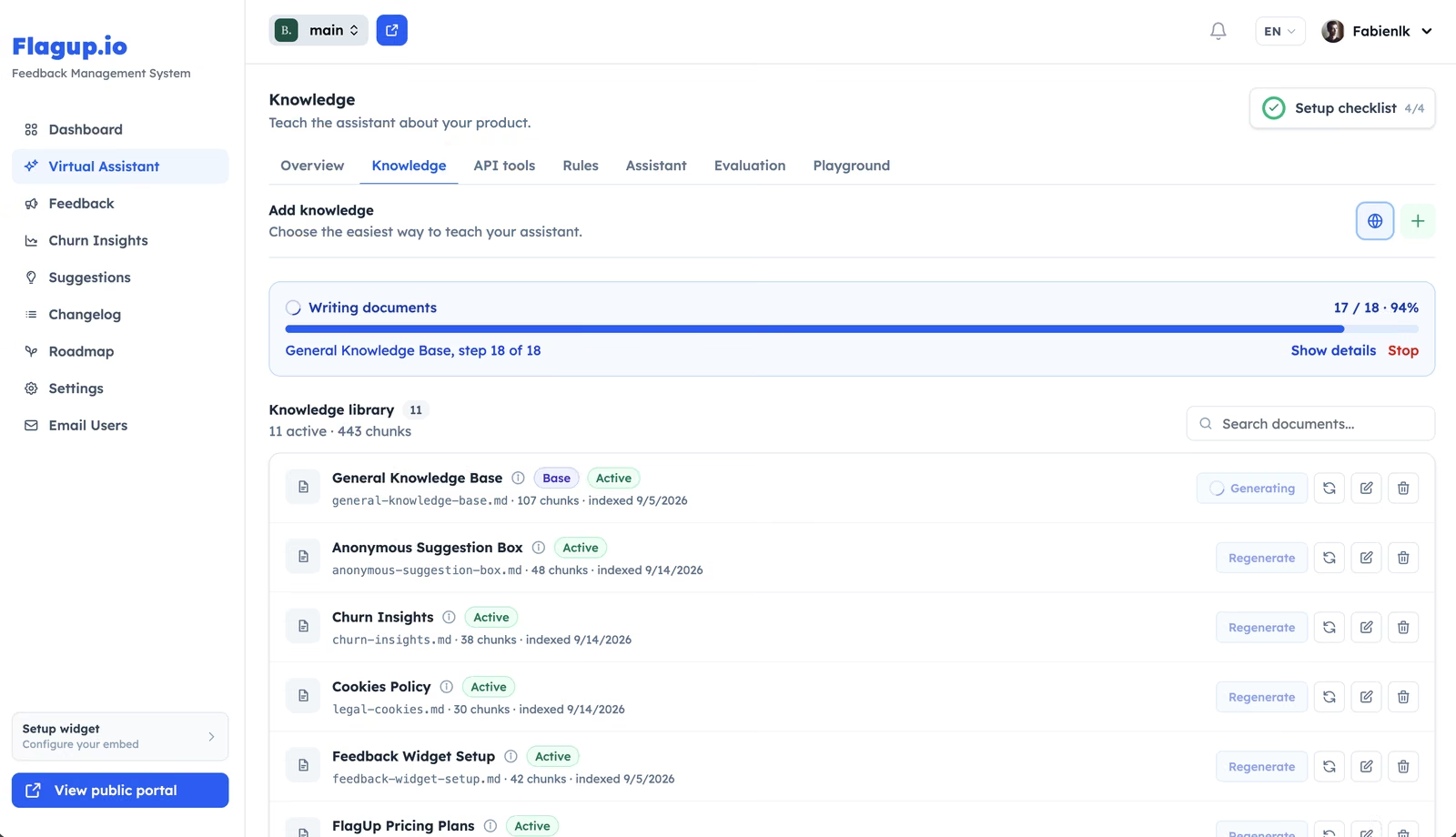
  1. It reads your website

    Point FlagUp at your registered domain and it reads your public pages, using your robots.txt and sitemap to find them. It is a bounded reader, not a general crawler: one domain, a capped number of pages, and the transactional and editorial paths left alone.

  2. You approve the plan

    The scan stops and shows you what it proposes to write before it writes anything. You choose which topics become answer documents. Nothing is generated until you ask for it.

  3. You go live when you are ready

    The assistant cannot be switched on until the project has a registered domain and at least one indexed document. Before that, a playground in the dashboard answers exactly as the live assistant would, and shows which chunks of which document each answer came from.

  4. Gaps come back to you

    Every question the knowledge base could not answer is recorded. Recurring ones are grouped by meaning rather than by wording, so you see the theme your content is missing instead of forty phrasings of it.

Grounding

Answers From Your Knowledge Base, Not the Open Internet

Retrieval happens before the model is involved, and what does not clear the bar never reaches it.

One project, one knowledge base

Retrieval is filtered to a single project. An assistant can only ever read the documents belonging to the project it runs on, so two products, two clients or two schools on one account never see each other's content.

A relevance floor, not a best guess

Every candidate passage is scored against the question and anything below the threshold is dropped rather than passed along as the closest available match. Only a small number of the strongest passages are ever sent.

Retrieved text is data, never instructions

Content pulled from your knowledge base, and anything returned by an API tool, is handed to the model as labelled data. Instructions that turn up inside retrieved text are not treated as instructions.

What FlagUp cannot promise is that a language model never invents anything. Nothing inspects the reply after it is generated. What FlagUp does is withhold weak matches and instruct the assistant to say the information is not available, which is a design choice you can inspect rather than a guarantee you have to take on faith.

Honest answers

It Tells Customers When It Does Not Know

This is the part most demos skip, and it is the part that decides whether an assistant is safe to put in front of customers. When nothing in the project clears the relevance floor, FlagUp does not hand the model the closest paragraph it could find and hope. It hands it nothing, and tells it to say the information is not available rather than fill the gap from general knowledge.

  • When your content does not cover a price, a policy or an availability date, the assistant is told to say so rather than fill it in.
  • A question outside the project's scope is declined rather than answered from the open internet.
  • The visitor is told the answer is not available, which is a better outcome than a confident wrong one.
  • The unanswered question is logged as a knowledge gap, so the miss becomes something you can fix.
Support deflection, both directions

The Right Conversations Become Product Feedback

Deflecting a repetitive question is worth something. Deflecting it and learning nothing is worth less than it looks. A generic AI chatbot reduces support tickets and leaves you with a transcript archive; the request buried in that conversation never reaches whoever decides what gets built.

FlagUp closes that gap. When a visitor's question scores against one of the project's own feedback categories, or when they mark an answer as unhelpful, the assistant offers to turn the conversation into feedback. It drafts a title, a description and a category from what was actually said.

The visitor edits that draft and sends it themselves. Nothing is created until they do, and the resulting item is linked back to the conversation it came from, so you can read the exchange that produced it.

See how the feedback widget works

Controls

Built for Control, Not Improvisation

An AI agent on your own website should behave the way you decide, and every one of these is set by the project owner.

Name, avatar and tone

Set what it is called, what it looks like, how formal it sounds and how long its answers run. It replies in the visitor's language by default, or in one you pick.

Behaviour rules you write

Plain-language rules go into the prompt, ordered by priority. Every project starts with a sensible default set, and you edit, disable or delete any of them.

Read-only API tools

Let the assistant answer from live data on your own endpoints. Only GET requests are ever executed, and the model sees only the response fields you choose.

A real off switch

Draft, enabled or disabled, enforced on the server rather than hidden in the widget. It also refuses to answer on any domain but the one you registered.

Analytics you can act on

Conversations, unique visitors, resolution rate, fallback rate, answer ratings, per-tool reliability, and the grouped list of questions your content does not cover.

Your own AI provider key

Connect an account with your own provider instead of using FlagUp's. Keys are encrypted at rest and never appear in a prompt, an export or an API response.

Privacy and retention

Conversation Storage Is a Setting, Not a Default You Cannot Change

The assistant is a channel your customers talk to. What it keeps is your decision, and the enforcement runs on a schedule rather than on request.

Storage you can switch off

Turn transcripts off entirely and the assistant still answers, it simply keeps nothing: no transcript, no visitor identity, no resumable thread.

A retention window a job enforces

Choose how many days conversations are kept. A scheduled daily job deletes what is past the window, so the setting is enforced rather than merely displayed.

Truncated visitor IPs

IP anonymisation is on by default and applied server-side from your project settings, not from anything the browser sends.

Export and delete

Export a single conversation as a portable record, delete one, or delete all of them.

Where it fits

AI Support Assistant vs a Generic Chatbot vs a Help Desk

FlagUp is not a support desk, and a page that pretended otherwise would waste your time. Here is the honest shape of it.

AI Support Assistant vs a Generic Chatbot vs a Help Desk
Generic AI chatbot FlagUp assistant Full help desk
Answers from your own content Varies Yes Varies
Says when it has no answer Varies Yes Yes
Unanswered questions reach your backlog No Yes No
Reports the topics your content is missing No Yes Varies
Ticketing, shared inbox and SLAs No No Yes
Live handoff to a human agent Varies No Yes

FlagUp has no ticket queue, no shared inbox, no service-level agreements and no handoff to a live agent. If you need those, you need a help desk, and FlagUp sits alongside one rather than replacing it.

Compare FlagUp with other tools

Plans

AI Token Allowances and Bring Your Own Key

The assistant is a paid capability. Each paid plan includes a monthly allowance of AI tokens per project, and the dashboard warns you as you approach it rather than cutting off silently. Usage is broken down by what consumed it, so a heavy month is explainable.

You can also connect your own AI provider key. A project running on its own key is never blocked by the FlagUp allowance, and its usage is tracked separately from it. Supported providers include the major hosted APIs, OpenAI-compatible endpoints and self-hosted models.

FAQ

AI Support Assistant Questions

Where does the AI assistant get its knowledge from?

From a knowledge base that belongs to a single project. FlagUp builds it two ways: an automated scan that reads the public pages of the domain you registered and proposes answer documents for you to approve, and entries you write yourself in the dashboard. It is not trained on your data and it does not read the open internet at answer time; it retrieves from that project's documents when a question arrives.

Can I see which document an answer came from?

Yes. The dashboard playground answers exactly as the live assistant would and lists the document chunks each answer was built from, with the relevance score of each one. The widget also shows visitors the source documents behind an answer. That is how you check the assistant before your customers do.

What stops the assistant from answering questions about something else?

Three things. Retrieval is filtered to one project, so it cannot reach another project's documents. Passages that are not relevant enough are dropped before the model is called, so an unrelated question usually arrives with nothing attached. And the public chat endpoint only answers on the domain you registered, so the assistant cannot be embedded and used somewhere you did not authorise.

Does the AI assistant replace a help desk?

No, and it is not trying to. There is no ticket queue, no shared inbox, no service-level agreement and no handoff to a live agent anywhere in FlagUp. It answers the repetitive questions your published content already covers and routes the rest into your product backlog. Teams that need a support desk run one alongside it.

What happens to the questions it could not answer?

They are recorded as knowledge gaps and grouped by meaning rather than by exact wording, so twenty different phrasings of the same missing topic arrive as one theme with a count and examples. That list is the practical output: it tells you what to write next, and writing it removes the gap.

Can I use my own AI provider instead of FlagUp's?

Yes, on the paid plans. Connect a key for a major hosted provider, any OpenAI-compatible endpoint, or a model you host yourself. Keys are encrypted at rest, are excluded from exports and API responses, and never appear in a prompt. A project on its own key is not limited by the FlagUp token allowance.

Do visitors have to create an account to use the assistant?

No. The assistant answers anonymous visitors in the widget, and email collection is off by default. If a conversation becomes feedback, the visitor still reviews and submits the draft themselves, and can do that without an account.

Still have a question? Email us at [email protected]

Put an AI assistant on your site that only says what you published

Start free, add the assistant when you are ready, and keep every question it could not answer.

FR ES PT